
In this ProfitMaps AI Review, I share what I found after going through the full demo, the sales page, the JV material and the app walkthrough. My short answer: I recommend ProfitMaps AI to anyone who wants a clear, visual way to start a local marketing service.
The tool scans how a local business shows up on Google Maps, turns that scan into a branded report, and gives you a solid reason to talk with the owner. I also like that the vendor doesn't sell a dream. The sales page says plainly that you still need to contact owners and follow up, and that honesty shaped how I wrote this guide.
Prefer to watch? One look at the colored map makes the idea click, so here's my full walkthrough.
Table of contents
- ProfitMaps AI Review: Quick Overview
- Is ProfitMaps AI Legit?
- ProfitMaps AI Features That Help You Win Local Clients
- How to Use ProfitMaps AI: Step by Step
- ProfitMaps AI Review: Plans, Pricing and Upgrades
- Who Should Use ProfitMaps AI?
- What I Like and What Could Be Better
- My Final ProfitMaps AI Review Verdict
- ProfitMaps AI Review FAQ
- My ProfitMaps AI Review Bonus Pack
ProfitMaps AI Review: Quick Overview
| Product | ProfitMaps AI, a web app that checks Google Maps visibility and turns it into reports, plans, websites and content |
|---|---|
| Creator | Chad Nicely, Nicely Media LLC (launch managed by Karthik Ramani) |
| Sold on | JVZoo. The launch window closed on October 27, 2026. |
| Front-end price | $37 one-time during launch. The vendor says later buyers move to monthly billing. |
| Bundles | Gold $297, Platinum $697 (or 2 payments of $397) |
| Guarantee | 30-day money-back guarantee on every plan |
| Runs in | Your browser, at app.profitmapsai.com. Nothing to install. |
| Support | 24/7 help desk at nicelysupport.com |
| Bonus | Yes, my bonus pack comes with your order |
| My rating | 4.6 / 5 |
See ProfitMaps AI on the official page
What ProfitMaps AI Is
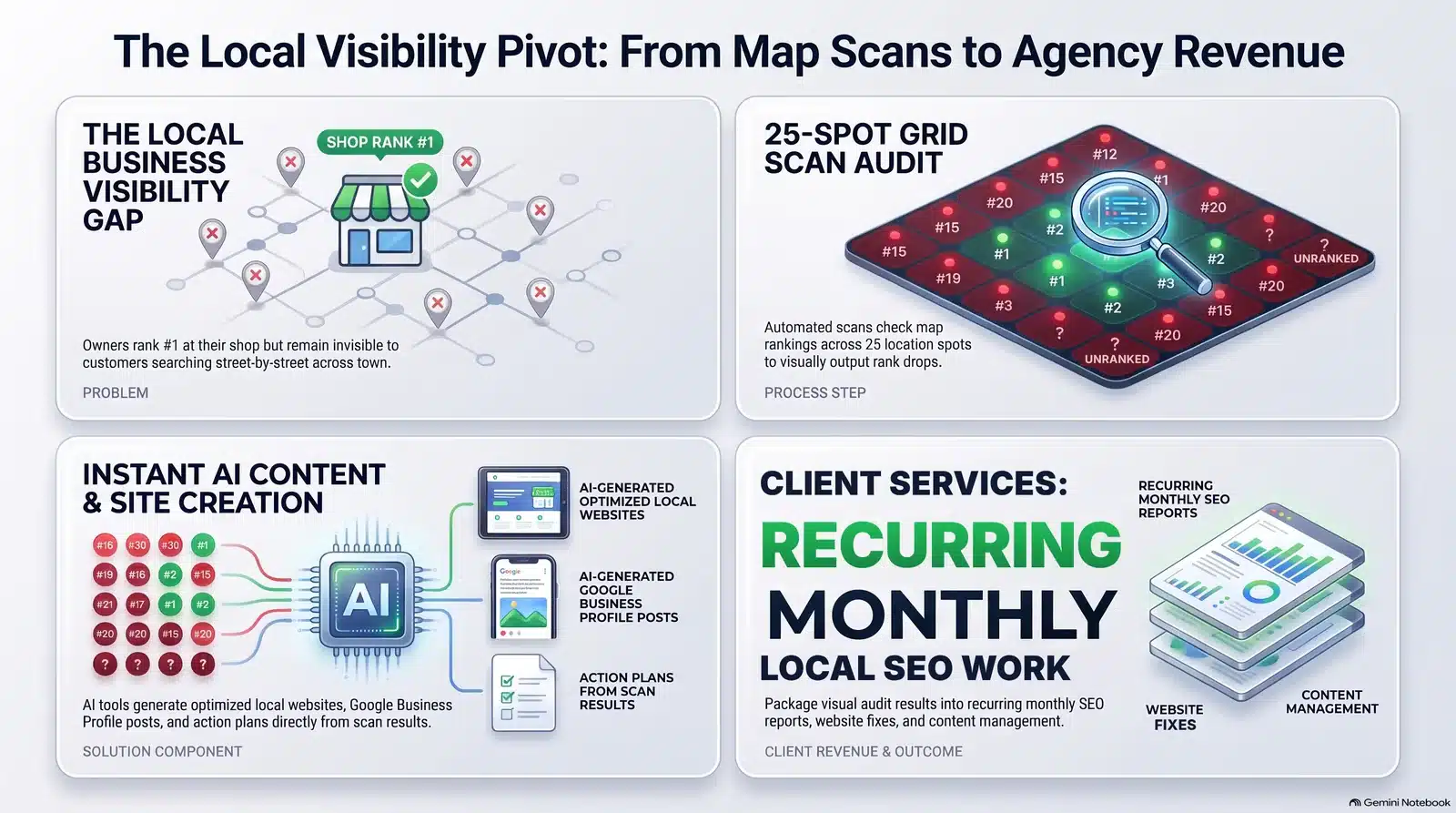
ProfitMaps AI checks how a local business ranks on Google Maps from many spots around town and shows the result as a colored map. Green dots mean the business appears near the top; red dots mean customers in that area can't find it.
From there, the app turns the scan into an A.I. action plan, a branded report, a sample website and fresh local content. The vendor calls the approach "map first, pitch second", and that sums it up well: you lead with a picture of the problem instead of a sales speech.
Who Is Behind ProfitMaps AI?
Chad Nicely created the product, and Nicely Media LLC handles support. Karthik Ramani managed the launch, and JVZoo processes every order, which gives buyers a familiar refund route.
The Problem It Solves
Picture a plumber called Dave. He has a decent Google profile and good reviews, so he assumes local customers can find him. One evening a family three streets away searches "plumber near me", and Dave doesn't show up near the top. A competitor gets the call, and Dave never knows.
That hidden gap sits at the heart of this ProfitMaps AI Review. Owners check their ranking from their own phone, inside their own shop, and see themselves near the top. A search from the other side of town can tell a very different story. For freelancers, the problem is proof: a generic "I can improve your SEO" pitch gets deleted, while a map of red dots gets attention.
Is ProfitMaps AI Legit?
Before I recommend anything, I run a quick trust check. For this ProfitMaps AI Review, I looked at five signals.
- Real product. A working web app with recorded screens, not just slides.
- Clear refund path. A written 30-day policy plus the JVZoo refund system.
- Known creator. Chad Nicely has run several launches on JVZoo.
- Honest disclaimers. The pages admit that rankings and income depend on your effort.
- Live support. A public help desk with a ticket system.
All five came back positive.
ProfitMaps AI Features That Help You Win Local Clients
The feature list runs long, so here it is grouped by what each part does for you.
See the Real Ranking
- Map scan grid. See the true rank from 25 or more spots around a business.
- Competitor analysis. Name the businesses that take your prospect's calls.
- Ranking history. Prove progress with repeat scans every month.
- Keyword finder. Spot the terms a website already ranks for.
Plan and Pitch
- A.I. action plan. A numbered to-do list in plain English that doubles as your service menu.
- Branded reports. Share a PDF, CSV or read-only link with your name and logo.
- Outreach templates. A first message, a follow-up, a pricing reply and an objection reply.
- Business Finder (upgrade). Lists and scores local businesses from 0 to 99.
Deliver the Work
- Website generator. Builds a site with a lead form; enquiries land in your leads inbox.
- Post and article writers. Draft Google Business Profile posts and local pages.
- Claim page. On higher plans, owners can order and pay through your own gateway.
- MCP connection. Link your own A.I. assistant to your account.
How the Map Grid and Credits Work
Google Maps rankings change with the location of the person searching. So the app places a grid of points over the area around a business, and each point acts like a real customer typing a keyword from that spot. The default grid is 5×5 (25 points), and higher plans open larger grids such as 9×9. Very large grids need your own map-data key.
Each point uses one credit, so a 5×5 scan costs 25 credits and a 7×7 scan costs 49. The finished map sorts each point into top 3, positions 4 to 10, 11 to 20, or not found. A line like "top 3 in just 2 of 25 spots" tells an owner more than a thirty-page audit. My advice: start with 5×5 scans and only use bigger grids for paying clients.
How to Use ProfitMaps AI: Step by Step
Using the demo and the app walkthrough, I traced the full workflow for this ProfitMaps AI Review, from finding a business to taking payment.
Pick a Local Business
Any business with a Google Maps listing works, such as a dentist or a roofer in your town. On the Basic plan you choose it yourself; the Business Finder upgrade scores businesses and filters for those with no website or no rankings.
Run the Map Scan
Add one or two keywords, such as "emergency plumber". The scan screen shows the grid size, radius and credit cost before you press the button. A scan finishes in a few minutes, and you can schedule repeat scans for monthly reporting.
Read the Map and Check Competitors
Tap any dot to see the exact rank at that spot. The competitor view lists which businesses beat your prospect and how often. This is the real "aha" moment: you can point to the names taking the owner's calls.
Get the A.I. Action Plan
The app writes a numbered to-do list based on the scan, such as profile updates, local pages or regular posts. The vendor advises checking every A.I. draft before publishing, and I agree.
Send a Branded Report
The report carries your name and logo. Export a PDF or CSV, or share a read-only link that expires after 7, 30 or 90 days, or never.
Build the Site, Write Content and Close the Deal
The website generator builds a site with a lead form, the post writer creates profile posts and the article writer drafts local pages. On higher plans, a claim page lets the owner pay through your own payment gateway.
Watch Before You Buy
A short video on what to check before you order, including the upgrades and the guarantee.
Why You Should Consider ProfitMaps AI
- Visual first. The colored map works as a sales tool, not just a tracking chart.
- Built for selling. Reports, scripts, websites and claim pages all point toward winning a client.
- Beginner friendly. You need no SEO background, because the A.I. plan explains each next step.
- Grounded claims. The vendor says its sample maps are illustrations and that results depend on your outreach.
I compared it with well-known geo-grid tools, using each vendor's public pricing page as of October 2026. Check them again before you buy.
| Tool | Price from | Billing | Site builder and outreach |
|---|---|---|---|
| ProfitMaps AI Basic | $37 | One-time (launch) | Included |
| Local Falcon Starter | $24.99 | Monthly | No |
| BrightLocal Track | $31 | Monthly, billed yearly | No |
| Local Viking | $39 | Monthly | No |
| Semrush Map Rank Tracker | $30 | Monthly | No |
Sources: Local Falcon pricing, BrightLocal pricing and Insites' grid tool roundup. The other tools track rankings very well, but none packs a website builder, writers, outreach scripts and claim pages into one sales workflow.
ProfitMaps AI Review: Plans, Pricing and Upgrades
Pricing often decides the deal, so this part of my ProfitMaps AI Review stays detailed. These were the launch prices; the vendor says buyers after October 27, 2026 move to monthly billing, so check the official page for today's price.
| Plan | Basic | Gold | Platinum |
|---|---|---|---|
| Launch price | $37 | $297 | $697 or 2 × $397 |
| Businesses | 10 | 50 | Unlimited (fair use) |
| Keywords each | 2 | 5 | No cap (fair use) |
| Websites | 10 | 50 | Unlimited |
| Reports | Your name and logo | White label | White label |
| Business Finder | No | Monthly allowance | Unlimited (fair use) |
| Agency tools | No | Yes | No caps |
Check today's ProfitMaps AI price
The 30-Day Money-Back Guarantee
Every plan carries a 30-day money-back guarantee. Ask for a refund within 30 days of each purchase, no reason needed, through the support desk or your JVZoo receipt. Refunds usually reach your card within 5 to 10 business days, and your access, credits and bonuses end once the refund goes through.
ProfitMaps AI Bundles
Instead of buying each upgrade on its own, you can pick one bundle at checkout.
- Gold, $297 one-time. 50 businesses, 5 keywords each, 50 websites, white-label reports, email follow-up, a monthly Business Finder allowance, Agency tools and the Pitch Pack. See the Gold Bundle
- Platinum, $697 one-time. No caps on businesses, keywords or websites, unlimited Business Finder, Agency Plus, 100 white-label client accounts and the biggest credit pool. See Platinum
- Platinum Two-Pay. The same Platinum package in 2 monthly payments of $397. See Platinum Two-Pay
ProfitMaps AI Upgrades (OTOs)
You don't need any upgrade to start. A few prices carried a "draft" label at launch, so your checkout page may differ slightly.
Order bump, Pitch Pack: about $17
Proposal templates and pitch scripts. Handy, but the free templates already cover the basics.
OTO 1, Pro: $67
9×9 grids, full white-label reports and automatic follow-up emails for new leads. A lighter Pro Starter appears at about $47 if you skip it.
OTO 2, Business Finder: $97
Lists and scores businesses in any niche and area. A Finder Lite downsell appears at about $47.
OTO 3, Agency: $147 or Agency Plus: $297
Client workspaces, read-only client logins, team members and extra credits. Agency Plus removes the caps under fair use. See Agency Plus
OTO 4, 3-Day Live Workshop: $197
A live walkthrough of finding, scanning, reporting and pricing. It ran from November 2 to 4, 2026, and came free with Gold and Platinum.
OTO 5, White Label: about $297 or $497
Client accounts on your own domain, for 10 or 100 clients. The vendor says these switch on from November 26, 2026.
Who Should Use ProfitMaps AI?
I wrote this ProfitMaps AI Review for people who want a simple local service to sell. Here's who gets the most from it.
A good fit if you are
- A freelancer adding a local service
- A digital marketer moving into local SEO
- An agency owner who needs fast prospecting and reports
- A consultant already working with local businesses
- A beginner who wants a first service to sell
Skip it if you
- Want guaranteed rankings or income
- Won't contact business owners
- Only want a pure rank tracker for an existing agency stack
Best Local Niches to Start With
Start with businesses that earn a lot from each new customer, because one extra call means real money to them: dentists, chiropractors and med spas; roofers, plumbers and HVAC companies; lawyers and accountants; locksmiths and pest control.
How It Can Help You Earn
The software doesn't pay you by itself; you earn by selling a service the app helps you prove and deliver. The sales page suggests three models: a one-time setup project, a monthly service with posts, pages and a fresh scan, or a report-only plan. The vendor's own example shows three clients at $250 a month, clearly labelled as an example, not a promise. In my view a one-time setup of $150 to $300 is easy for most owners to accept, but adjust it to your city and niche.
Any figures here are examples, not promises. Most people earn little or nothing with any business tool, and your results depend on your effort, skills and market.
How I Would Land My First Client
- Choose one niche in your own city, such as dental clinics.
- Scan five clinics for "dentist near me".
- Pick the two with the most red dots.
- Send each owner a short message with the report link: "Did you know you drop out of the top results on most of the east side?"
- Offer a small first project, then a monthly plan once results show.
Mistakes to Avoid
- Running huge grids too soon, which burns credits fast.
- Sending the report without one friendly line about the owner's area.
- Publishing A.I. drafts without checking facts with the owner.
- Promising first place instead of effort and reporting.
- Giving up after one week; most replies come after the second or third follow-up.
Once you have local clients, webinars are an easy service to add. My EverPitch Review looks at an AI tool agencies can use to build and run webinars for clients under their own logo.
What I Like and What Could Be Better
No tool is perfect, so here is the balanced list I built for this ProfitMaps AI Review.
What I like
- Visual map reports owners understand instantly
- A one-time launch price instead of a monthly bill
- An A.I. action plan that turns data into a service menu
- Website, post and article writers in one app
- Branded reports and outreach templates ready to use
- A 30-day money-back guarantee through JVZoo
What could be better
- Scans use credits, so heavy users must top up
- Grids above 9×9 need your own map-data key
- Business Finder and full white label sit in upgrades
- Later buyers move to monthly billing
- You still handle outreach yourself
My Final ProfitMaps AI Review Verdict
4.6out of 5
I've looked at many make-money tools, and most promise far more than they deliver. This one feels different: it solves a real problem that owners can see with their own eyes. Find a business, scan it, show the map, offer the plan and deliver the work. Nothing in that chain depends on luck or hype.
That's the heart of this ProfitMaps AI Review. Start with the Basic plan, run your first scans and send your first reports, and add Pro or Business Finder only when you need them. With the 30-day guarantee, you risk very little while you test the method.
ProfitMaps AI Review FAQ
Do I need SEO experience?
No. The app writes the report and the next steps for you, so a complete beginner can follow along.
Is it a one-time payment?
During the launch you paid once for your plan. The vendor says buyers after October 27, 2026 move to monthly billing, so check the official page for current pricing.
How do credits work?
One credit covers one map point, so a 5×5 scan uses 25 credits. Each plan starts with a credit pool you can top up later.
Does it find businesses for me?
On Basic you choose the businesses yourself. The Business Finder upgrade lists and scores them, but you still send the messages.
Can I promise a client first place?
No. Many factors affect rankings, so promise effort and clear reporting rather than a fixed position.
Do I need access to the owner's Google profile?
Not for scans or reports. You or the owner simply copy the written posts into the business profile.
Can I use it for my own business?
Yes. The vendor confirms you can scan and improve your own local business too.
How do I get your bonuses?
Buy the front end through any button on this page. If the bonuses aren't in your purchase area, email your receipt to team@1markit.com and I'll send them over.
My ProfitMaps AI Review Bonus Pack
Buy ProfitMaps AI through my link and you get everything below at no extra cost.
Training and Swipe Files
- 1A.I. Cash Clone training
A step-by-step video course on building an A.I. persona, setting up an Instagram account around it and posting every day.
- 230 Viral Videos swipe file
Short videos that pulled big engagement, so you can study hooks, pacing and captions for your clients' content.
Ten Playbooks on Traffic, Content and A.I.

A.I. Clone Cash Machine

Instagram Caption Vault

Instagram Traffic Hacks

Pinterest Traffic Hacks

Reviews That Convert
Social Media Marketing Boost

The AI Persona Playbook

The Faceless Channel Playbook

The Patient Domain Playbook

The Product Finder Guide
How to Claim Your Bonuses
- Buy through my link. Use any ProfitMaps AI button on this page for the front-end plan.
- Check your purchase area. Your bonuses come with your order on JVZoo.
- Missing something? Email your receipt to team@1markit.com and I'll send it over.
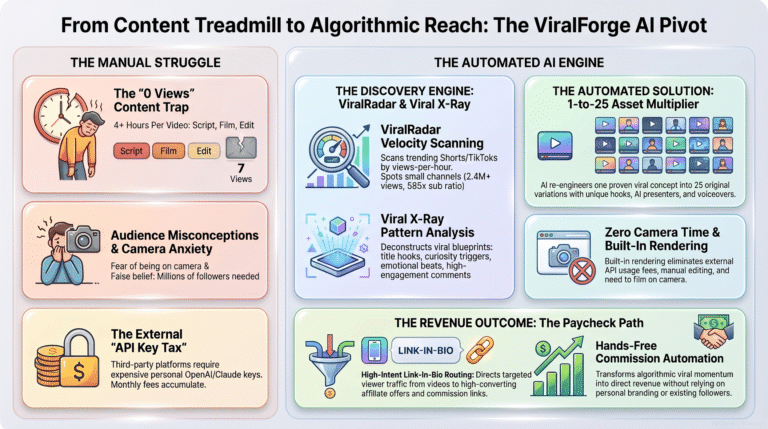
Disclosure: this ProfitMaps AI Review contains affiliate links. If you buy through them, I may earn a commission at no extra cost to you. This review is based on the vendor's demo, app walkthrough, sales page and launch material. Results vary, and nothing here promises income, rankings or clients. ProfitMaps AI has no ties to Google, and Google Maps is a trademark of Google LLC. Read my full affiliate disclosure or the FTC's endorsement guidance. You may also like my ViralForge review.