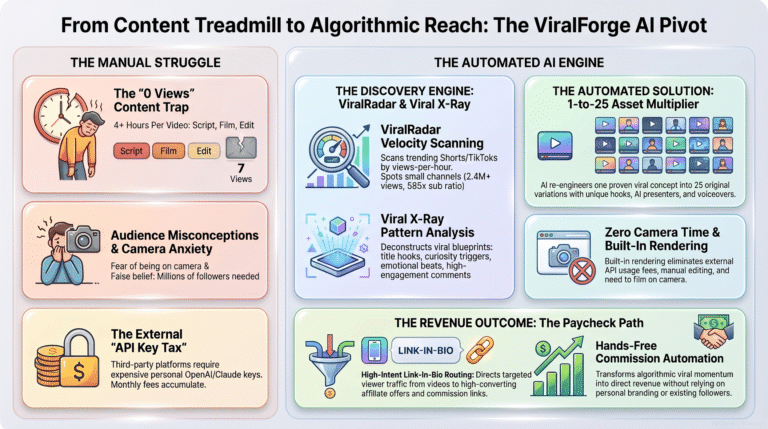


TubeHarvest Review: 2 Reasons Why I Do NOT Recommend It

Before you spend a dime on TubeHarvest, read this unfiltered breakdown. While the sales page promises effortless YouTube growth and automation, our hands-on test revealed serious limitations you need to know about. In this TubeHarvest review, we expose the hidden catches, OTO traps, and show you a far more reliable alternative that actually delivers long-term results.

Santonu Sarker Santo

Santonu Sarker Santo

A.I. ToolsPublished Updated 20 min read

This review contains affiliate links. If you buy through them, I may earn a commission at no extra cost to you, and it never changes my verdict. How I make money

TubeHarvest Review_Feature image

Making a faceless YouTube video is the easy part now. Plenty of AI apps can write a script, add a voice and cut the clips. The hard part is knowing which video to make, and getting the people who watch it onto your email list.

That is the exact gap TubeHarvest says it fills, so in this TubeHarvest Review I put it next to the tools I already use. TubeHarvest is a cloud AI app that turns one topic into a full YouTube package: a long video, Shorts, a thumbnail, SEO text, a landing page and a free PDF guide to collect emails.

I tested it for this TubeHarvest honest review, and I'll be straight with you. It works, and parts of it are good. But I don't recommend buying it, for two reasons I explain below. I also show you the setup I would use instead, which is ViralForge for finding and making videos, plus a lead page built with Claude.

Editor's Quick Verdict: TubeHarvest Review

  • What it is: A cloud AI app that turns one topic into a faceless YouTube video, Shorts, a thumbnail, SEO text, an opt-in page and a lead magnet PDF.
  • Best for: People who already know their niche and exactly which topics to cover.
  • The problem: It makes a video on any topic you type, but it gives you no idea which topics are already pulling views.
  • Price: $47 one time for the Commercial front end at launch.
  • Better option: ViralForge for viral-first videos, plus a free lead page made with Claude.
  • My rating: Not Recommended
TubeHarvest Review product picture showing the topic to YouTube package app
TubeHarvest Review: the app turns one topic into a faceless YouTube package and a lead capture page.

See the ViralForge Alternative I Use

Affiliate disclosure: some links on this page are affiliate links. I don't use an affiliate link for TubeHarvest.

Table of contents
  1. TubeHarvest Review at a Glance
  2. The Problem TubeHarvest Tries to Fix
  3. What Is TubeHarvest?
  4. How Does TubeHarvest Work?
  5. Inside the Dashboard
  6. TubeHarvest Features I Tested
  7. Sample Output
  8. My TubeHarvest Honest Review
  9. Is TubeHarvest Worth Buying?
  10. Demo Video
  11. TubeHarvest Alternative: ViralForge + Claude
  12. TubeHarvest Pricing and OTOs
  13. TubeHarvest Pros and Cons
  14. Who Should Buy
  15. Refund Policy
  16. TubeHarvest Review Verdict
  17. TubeHarvest Review FAQs
  18. Bonuses

TubeHarvest Review at a Glance

Here is my TubeHarvest Review in one table: what you get, what it costs and where it falls short.

Product nameTubeHarvest
CreatorMax Gerstenmeyer, with Wayne Crowe as launch partner
Launch windowNov 17, 2026, 11:00 AM EST to Nov 23, 2026, 11:59 PM EST
Sold onJVZoo
Front-end price$47 one time (Commercial), at launch
Other planPersonal, $27 a month, no client rights
CouponHarvest50, $50 off the TubeHarvest Bundle
Output per topicLong video, Shorts, thumbnail, SEO text, opt-in page, lead magnet PDF
Front-end limits10 packages a month, videos up to 5 minutes, 3 Shorts per package
PlatformYouTube and YouTube Shorts (you upload)
Refund14-day money-back guarantee
Best forCreators who already know which topics to cover
Product pageTubeHarvest official product page
My ratingNot Recommended

TubeHarvest Pricing and OTOs at a Glance

OfferPriceMy call
Front end: Commercial$47 one time✗ Skip
Bump: Niche Harvest Vault$9✓ Only if you buy
Bump: Thumbnail & Hook Booster$14✗ Skip
Fastpass (all upgrades)$277 one time✗ Skip
Upgrade 1: Premiere$47 a month✗ Skip
Upgrade 2: Harvest Growth$47 one time✗ Claude does this
Upgrade 3: DFY Channel Pack$37 one time✗ Skip
Upgrade 4: Whitelabel$97 to $297 one time✗ Skip
Bundle$297 ($247 with Harvest50)✗ Skip

Prices come from the vendor's JV page and can change during launch week. Full details are in the TubeHarvest pricing and OTOs section.

How I Scored This TubeHarvest Review

Instead of a star score for every point, I marked each area as good or weak. The overall call is what matters in this TubeHarvest Review.

What I checkedWhat I looked atResult
Video outputScript, AI voice, visuals, captions and Shorts from one topic✓ Good
Own voiceAdding your own voice to a faceless video✓ Good
SEO textTitles, descriptions, tags and chapters✓ Good
Topic researchHelp choosing topics that already get views✗ Missing
Lead captureOpt-in page and PDF compared with a Claude page and FluentCRM✗ Easy to replace
Value for money$47 plus upsells against ViralForge plus Claude✗ Weak
OverallGood video engine, weak strategyNot Recommended

Check the ViralForge Alternative

The Problem TubeHarvest Tries to Fix

Most faceless YouTube channels chase views and stop there. A video gets a few thousand plays, the viewers leave, and the creator has nothing to show for it except a small AdSense number. No list, no follow-up, no second sale.

Smart creators flip that. They use the video as the hook and a free guide as the reason to join an email list. The list is the asset. But building that system by hand means a script, a voiceover, editing, a thumbnail, SEO, a landing page, a PDF and an email tool. That is a lot of separate jobs for one video, and it is the problem I kept in mind for this TubeHarvest Review.

What Is TubeHarvest?

TubeHarvest is a cloud-based AI app that turns any topic into an upload-ready faceless YouTube package, then builds a landing page and a lead magnet PDF so viewers become email subscribers. The vendor calls this the Harvest Loop: the video brings people in and the free guide turns them into leads.

From one topic, here is what I got during my TubeHarvest Review test:

  • A long-form video. Scripted, voiced with a natural AI voice and edited with matching visuals and captions. No camera, no editing.
  • Ready-to-post Shorts. The strongest moments get re-cut as vertical Shorts, so one topic works twice.
  • An AI thumbnail. A bold, high-contrast thumbnail made for the topic.
  • SEO text. Titles, descriptions, tags and social captions.
  • A landing page. A hosted opt-in page built around the video topic, ready to drop in the description.
  • A lead magnet PDF. A mini-guide on the topic, sent to every new subscriber.

TubeHarvest Scam or Legit?

People keep asking me the TubeHarvest scam or legit question. It is legit. It is a real app sold on JVZoo with a 14-day refund window, and it does what the sales page says. My issue is not whether it works. It is whether it is the smart way to spend $47.

How Does TubeHarvest Work?

TubeHarvest works in five steps: you type a topic, it writes and voices the script, renders a long video and Shorts, writes the SEO text and thumbnail, and then builds an opt-in page with a free PDF guide. You upload the video to YouTube and put the page link in the description.

  1. Pick a niche and type a topic

    Choose a category and enter the topic you want a video on.

  2. Get the script and voice

    The AI writes the script and voices it with an AI voice, or your own voice.

  3. Render the video and Shorts

    It edits the long video with visuals and captions, then cuts Shorts from the best moments.

  4. Get the SEO pack and thumbnail

    Titles, description, tags, chapters, social captions and a thumbnail are made for you.

  5. Collect leads

    A hosted landing page and a matching PDF guide go live, ready to link from your video.
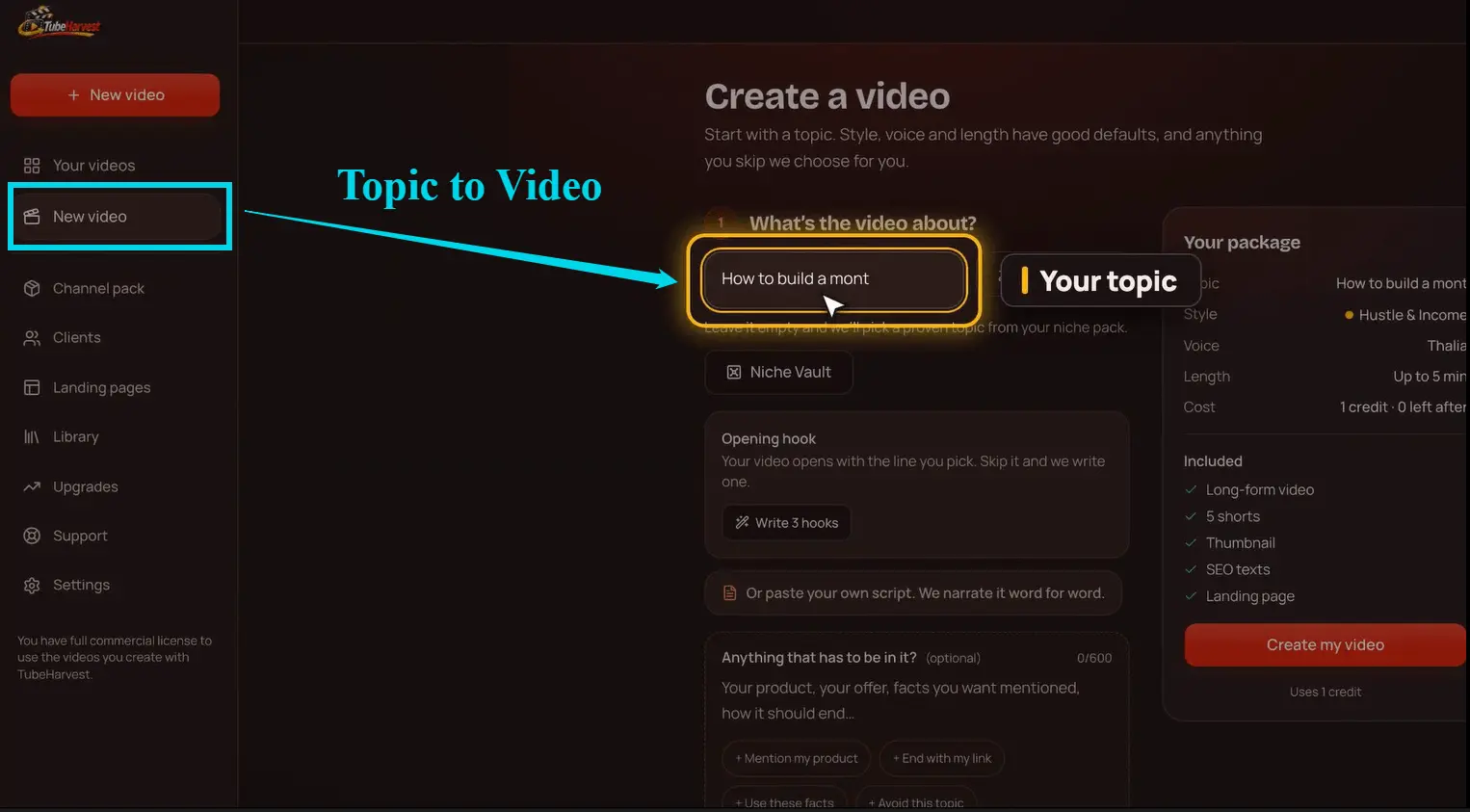
TubeHarvest topic to video generation screen where one topic starts the whole package
One topic in, and the whole package starts building.

Notice where it starts: with a topic you bring. Keep that in mind, because it is the heart of my main complaint later in this TubeHarvest honest review.

Inside the TubeHarvest Dashboard

The first thing I checked for this TubeHarvest Review was the dashboard. It is clean and simple. Your video packages sit in one list, and each one opens to show the video, the Shorts, the thumbnail, the SEO text and the landing page together. A beginner won't get lost here.
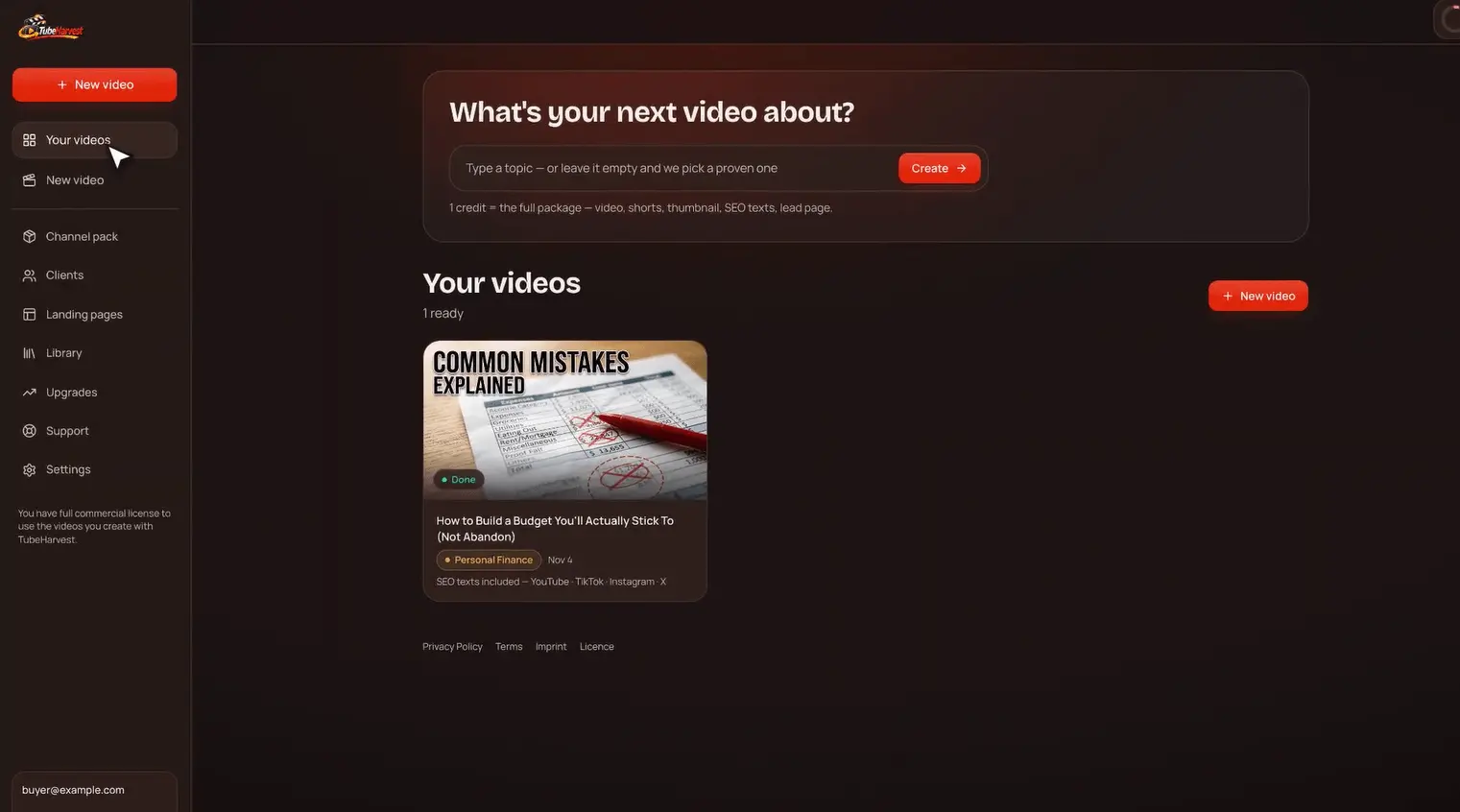
TubeHarvest Review of the dashboard with video packages, Shorts, thumbnails and landing pages
The TubeHarvest dashboard, where each topic becomes one package.

What you won't find on this screen is any data about what is trending. There is no list of videos that are already pulling views in your niche, no view counts to compare, and no suggestions. The dashboard waits for you to decide.

TubeHarvest Features: I Tested the Full Package

For this TubeHarvest Review I ran the whole package. Here is what each part did when I tested it, and how it compares with the tools I already use.

1. Niche categories

You start by picking a niche category, then typing a topic. The categories help you stay on track, but they don't tell you which topic inside that niche people actually want to watch right now.
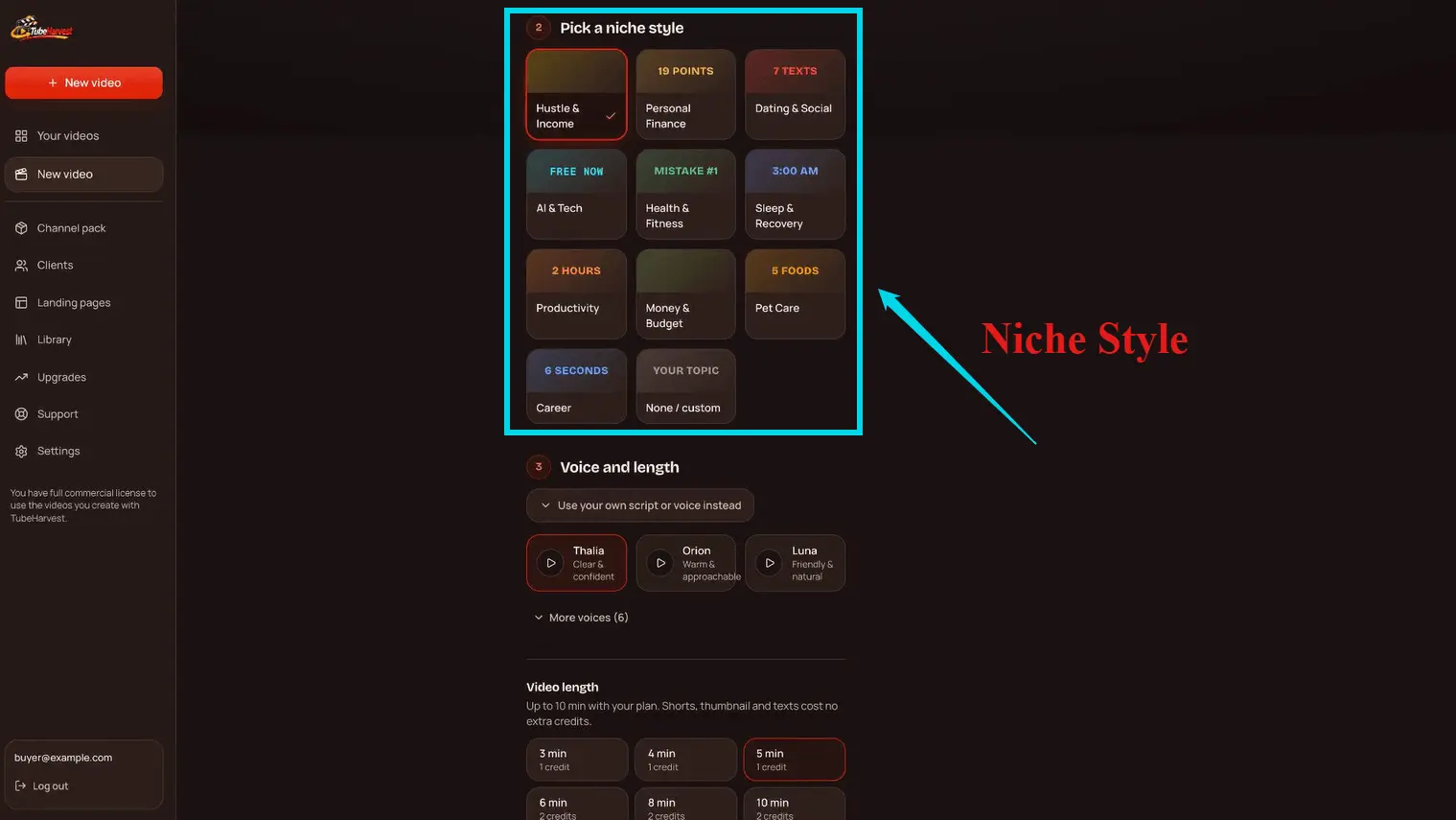
TubeHarvest niche category picker before typing a video topic
Niche categories. Useful for focus, but the topic choice is still yours.

Compare that with the TubeHarvest alternative I use, ViralForge, which starts from the other end. It first finds which videos are already going viral on YouTube, TikTok and Instagram by topic and niche, and only then builds your version.

2. Topic to full video

This is the core engine, and it does a decent job. Type a topic and you get a scripted, voiced, edited long video with matching visuals and captions. No camera, no timeline editing.
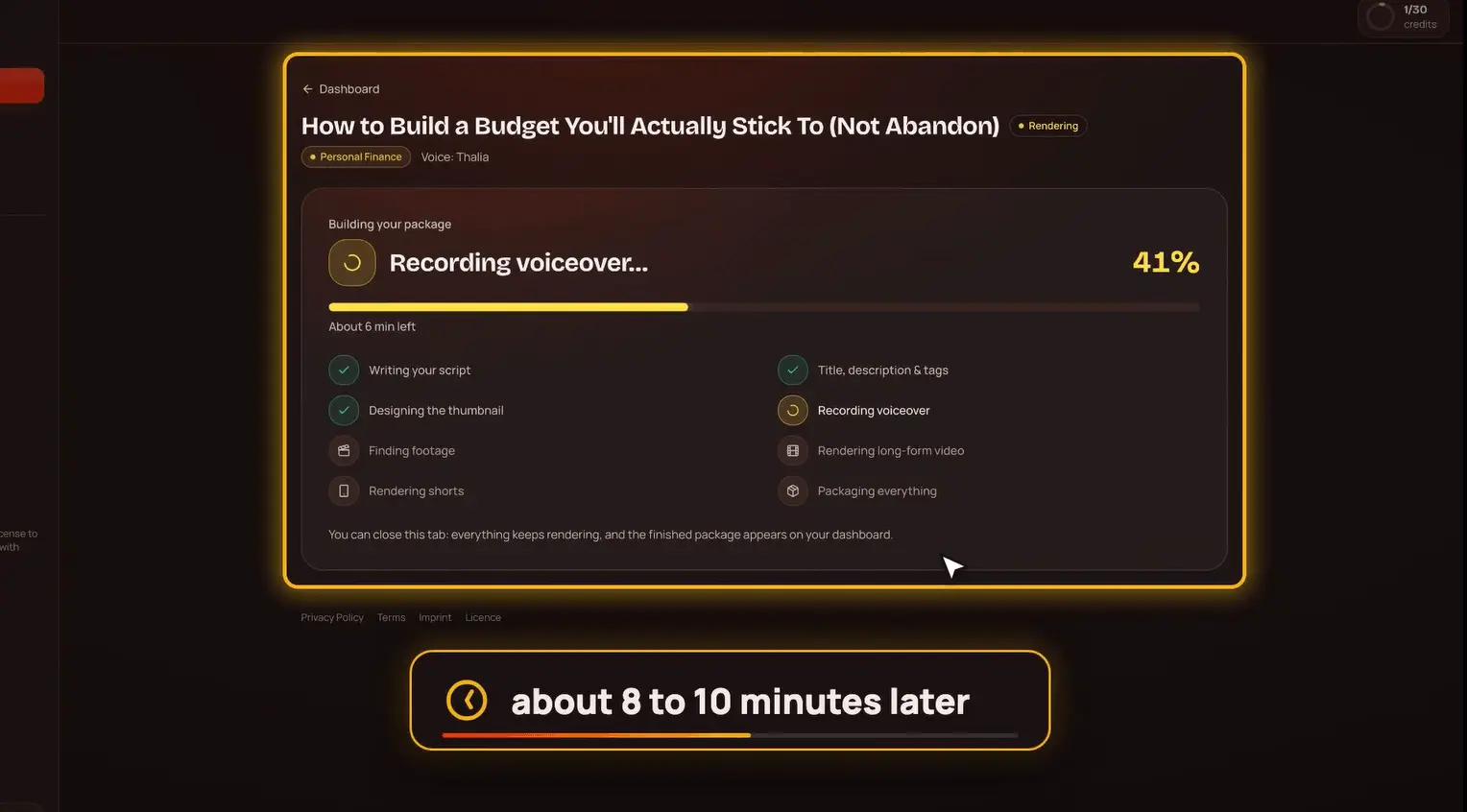
TubeHarvest video rendering progress for a faceless YouTube video
Rendering the long video and Shorts from one topic.

On the front end, videos top out at 5 minutes, with 10 packages a month. Longer videos (8 or 10 minutes) and more packages sit behind the monthly upgrades.

3. Your own voice on a faceless video

In my TubeHarvest Review, this is the feature I liked most. You can add your own voice to the video while staying faceless. Getting your own voice into AI videos usually means a paid ElevenLabs plan, which gets expensive fast if you make videos often. Here it is part of the package.
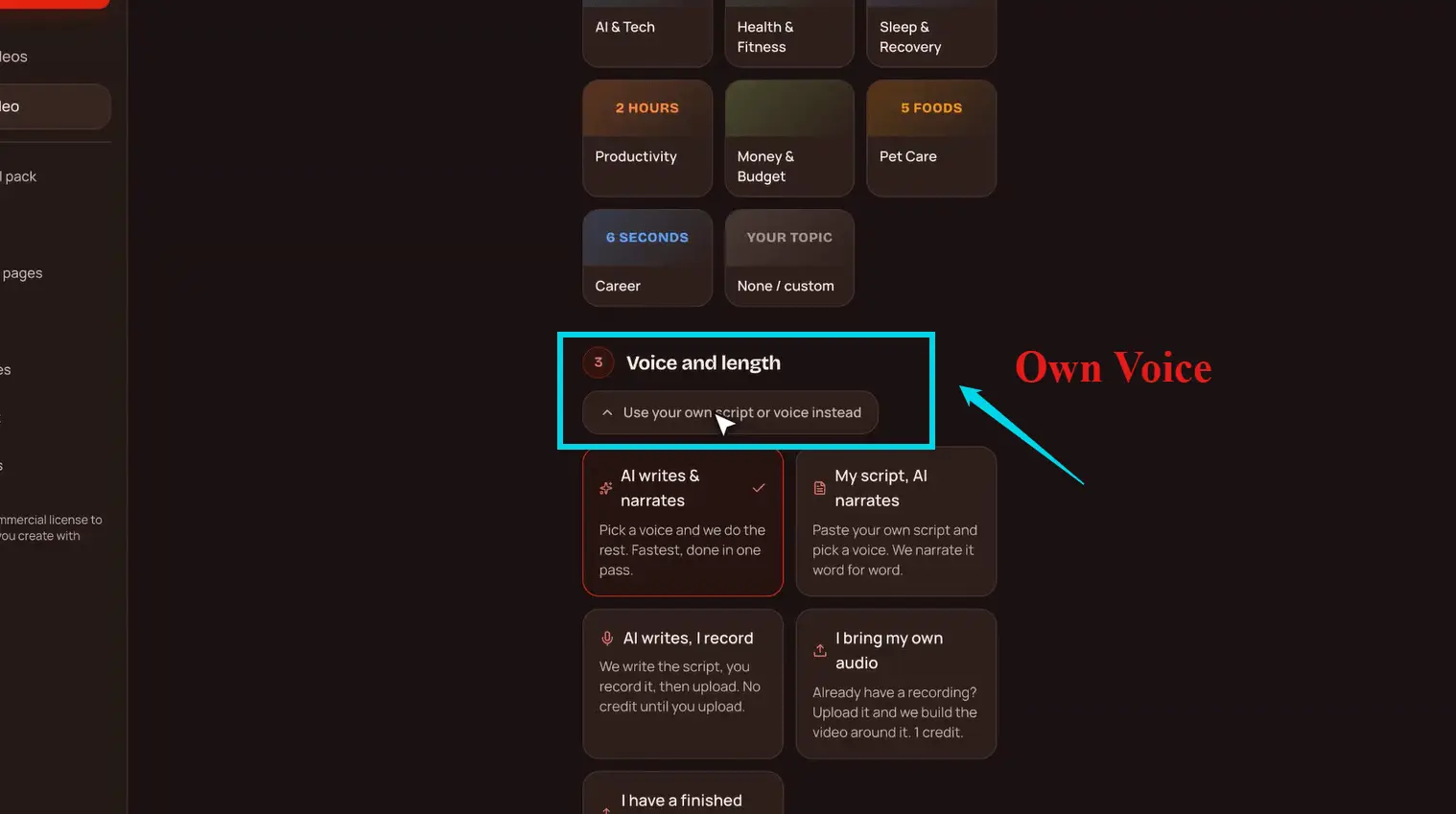
TubeHarvest own voice capture for faceless videos
Own voice capture, so a faceless video still sounds like you.

4. Automatic SEO title, description, tags and chapters

Every video comes with a keyword-rich title, description, tags and chapters, plus social captions. This saves real time, and the text was usable as is. It is the second clear advantage TubeHarvest has.
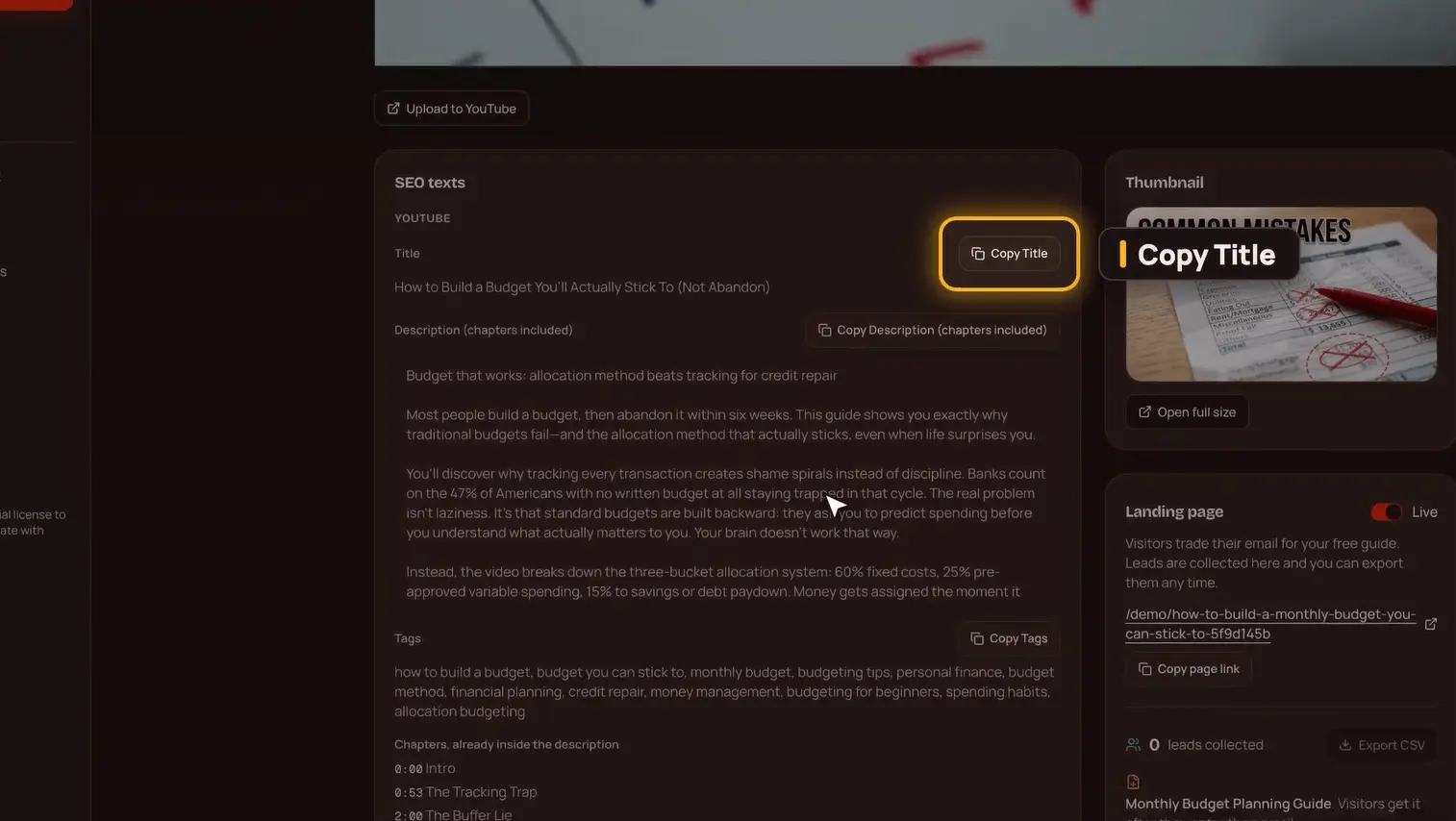
TubeHarvest Review of automatic SEO title, description, tags and chapters generation
SEO title, description, tags and chapters, made for each video.

5. AI thumbnail and Shorts

Each package includes one AI thumbnail and, on the front end, 3 Shorts cut from the long video. That means one topic gives you content for YouTube and YouTube Shorts at once.

6. Automatic landing page

TubeHarvest builds a hosted opt-in page around each video topic, so you don't have to design one. For a total beginner, that is convenient.
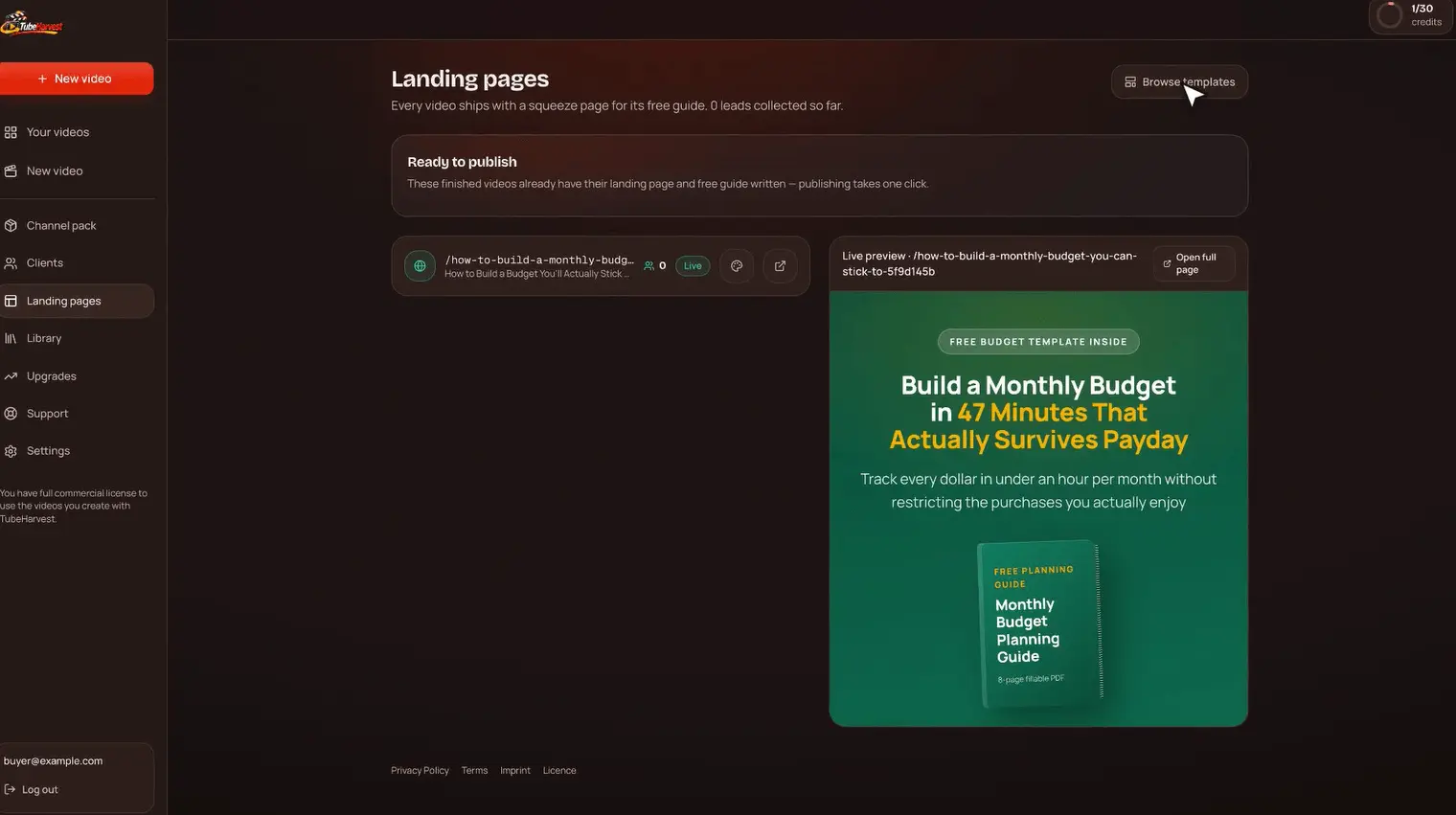
TubeHarvest automatic landing page with email capture built around the video topic
A topic-based landing page, made automatically.

But here is the honest part of my TubeHarvest Review: this is easy to do yourself now. Claude can build a better landing page from a plain request, and any beginner can paste that code into a custom HTML block on their own website. I show how in my video, I let Claude do my website. Note too that the front end includes only one landing page template. More templates sit in the Harvest Growth upgrade.

7. Lead capture system and PDF lead magnet

Every new subscriber gets a mini-guide PDF on the video topic. It gives people a reason to join, which is the whole point of the Harvest Loop.
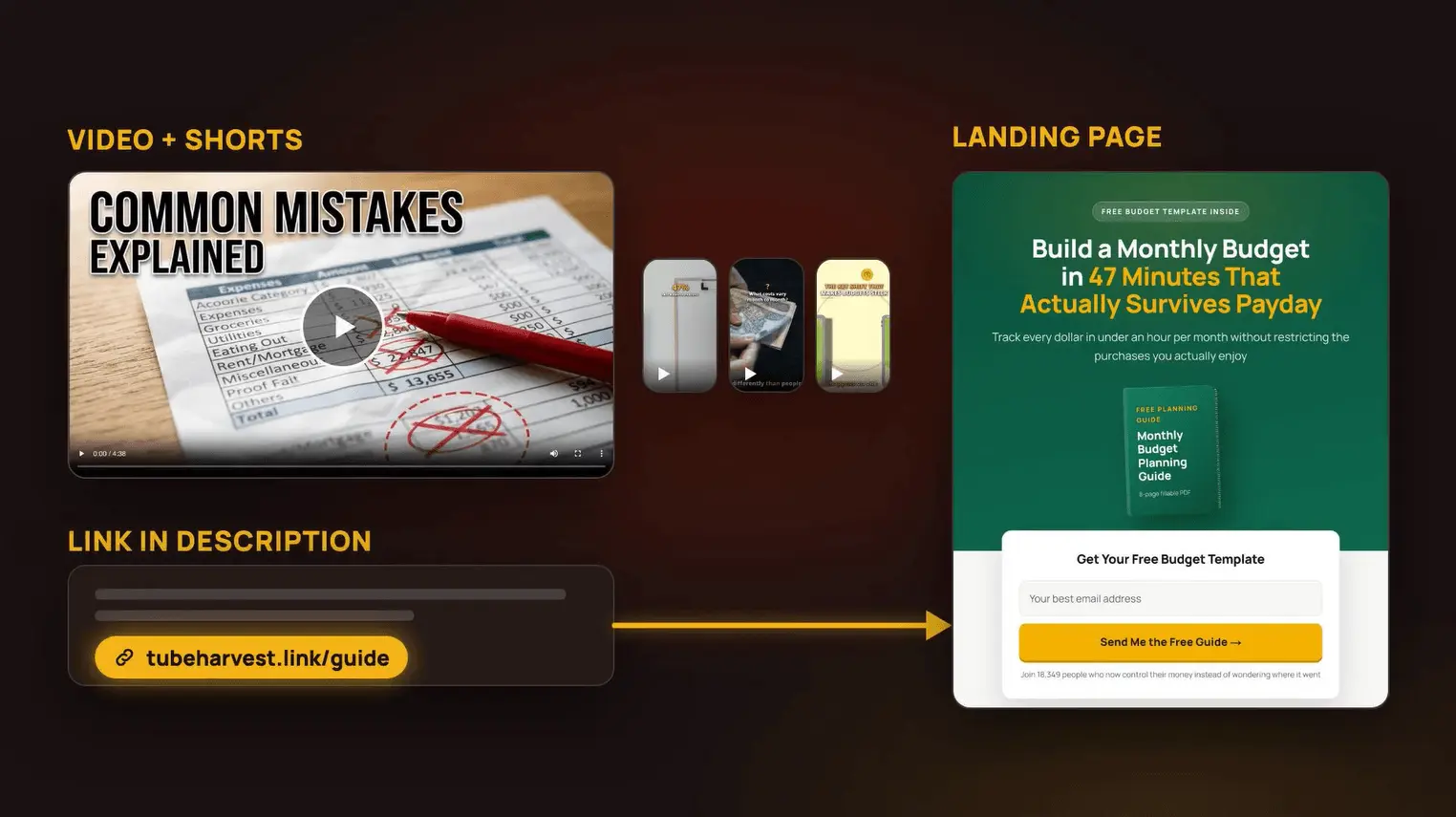
TubeHarvest lead capture system with a PDF lead magnet for new subscribers
The lead capture system: video, opt-in page and free PDF guide.

On the front end the PDF is a basic one, and the 5-email follow-up sequence is part of the Harvest Growth upgrade. If you connect a Claude-built page to FluentCRM or GetResponse, you get email automation and follow-ups on a platform you control.

What Does a Finished TubeHarvest Package Look Like?

A finished TubeHarvest package is a voiced long video with captions, a set of Shorts, a thumbnail, an SEO pack and a live opt-in page with a PDF guide. In my TubeHarvest Review test, the quality was fine for a faceless channel. The video looks like a typical AI faceless video: stock-style visuals, captions and a steady voice.

The output is not where TubeHarvest falls short. What decides whether this video gets watched at all is the topic, and that is where the app leaves you on your own.

My Honest TubeHarvest Review Experience

Let me be clear about where I stand. This TubeHarvest honest review is not a hit piece. TubeHarvest makes videos, writes SEO text, adds your own voice and builds an opt-in page, and it all works. Everything below is my own observation from testing it, in line with how I review tools on 1Markit.

When I tested it, the workflow was simple: topic in, package out. The own-voice option and the automatic SEO text (titles, descriptions, tags and chapters) were the two parts I would happily pay for. The automatic landing page is handy too, since you skip the job of building one.

The trouble started when I asked myself a simple question: which topic should I type? TubeHarvest had no answer.

Is TubeHarvest Worth Buying? 2 Reasons I Say No

TubeHarvest is not worth buying for most people, because it makes videos on random topics with no view data behind them, and its main extra, the lead page, is something Claude can build better for free. A tool that finds viral topics first gives you more views and more leads.

Reason 1

Topic selection is left to you

TubeHarvest makes a video on any topic you type, but it doesn't show what is already viral or suggest topics. New creators don't know which topic to pick or what lead to capture, so they guess. A guessed topic usually means few views, and few views means few leads.

Reason 2

The lead page is easy to replace

The automatic landing page is the big selling point. But Claude can build a sharper page from a plain request, you paste it into custom HTML on your site, and you connect FluentCRM or GetResponse for emails. The front end gives you one template and a basic PDF.

So, is TubeHarvest worth buying? Here is how I think about it. If I already know what is viral and build my video on that, I get views and leads together. A video on a viral or proven niche topic simply runs further than a random one. That is why I would rather start from data than from a blank topic box.

If TubeHarvest suggested topics based on what is trending, or showed which videos are already viral and then built the video and lead page around them, I would rate it very differently in this TubeHarvest Review. Right now it doesn't.

TubeHarvest Demo Video

Before you read the rest of my TubeHarvest Review, watch the official TubeHarvest demo below to see the topic box, the video package and the landing page before you decide.

As you watch, notice the first step. The demo starts with a topic that is already chosen. That is the step most beginners get stuck on.

TubeHarvest vs ViralForge + Claude: Which Gets More Views and Leads?

This is the most important part of my TubeHarvest Review. ViralForge plus a Claude-built lead page gets more views and leads for most beginners, because ViralForge starts with videos that are already viral and Claude gives you a better opt-in page you own. TubeHarvest only wins on convenience, since it builds the page for you automatically.

PointTubeHarvestViralForge + Claude
Where you startA topic you typeVideos already viral in your niche
Topic research✗ None✓ Finds viral videos by topic and niche
PlatformsYouTube and Shorts, you uploadYouTube, TikTok, Instagram, posts for you when accounts are linked
PresenterFaceless, AI voice or your own voiceModified to your face or your instructions
SEO title, tags, chapters✓ AutomaticCaptions and hashtags per version
Landing pageAutomatic, 1 template on front endBuilt with Claude, fully custom, on your own site
Email follow-up5-email sequence in an upgradeFluentCRM or GetResponse automation
Who owns the pageHosted by TubeHarvestYou

Is there a better TubeHarvest alternative?

Yes. For most people the better TubeHarvest alternative is ViralForge plus a lead page built with Claude. ViralForge finds what is already viral on YouTube, TikTok and Instagram, rebuilds it with your face or instructions, and publishes it for you. Claude builds the landing page you link from every video.

My setup instead of TubeHarvest
  1. Find the winners. Use ViralForge to see which videos are already viral in your niche across YouTube, TikTok and Instagram.
  2. Make your version. Let ViralForge modify the video with your face or your instructions, then auto-publish to your linked accounts.
  3. Build the lead page. Ask Claude for a landing page around that topic and paste it into a custom HTML block on your site.
  4. Automate the emails. Connect the form to FluentCRM or GetResponse so every new lead gets your guide and follow-ups.

That is the TubeHarvest alternative I would pick every time. I built my own site this way, and you can watch the process here:

TubeHarvest vs a monthly tool stack

To be fair to TubeHarvest, it does replace a few monthly tools. A typical faceless setup means a video tool, a paid ElevenLabs plan for your own voice, a page builder and an email tool. TubeHarvest packs the first three into a $47 one-time front end, with limits. That is its real value. But a tool that saves you money on making videos you can't get views on is not a saving.

For the full breakdown of the alternative, read my ViralForge review. For short talking videos to promote your list, my ViralSpeak AI review is worth a look too.

Get ViralForge, the Viral-First Alternative

TubeHarvest Pricing and OTOs: How Much Does It Cost?

TubeHarvest pricing and OTOs look simple, but they add up fast. TubeHarvest pricing starts at $47 one time for the Commercial front end during launch, which runs from November 17 to November 23, 2026. There is also a Personal plan at $27 a month without client rights. After the front end you will see two order bumps, a Fastpass and four upgrades, each with a cheaper downsell.

Check before you pay: the sales page says Commercial is one time, but it also says the price "goes to $97" after launch and its FAQ mentions $97 a month. Read the checkout page to see whether you are paying once or monthly.

Coupon Code

Use coupon code

Harvest50

for $50 off the TubeHarvest Bundle ($297 to $247)

TubeHarvest OTOs: All 5 Upsells and Prices

Here is every TubeHarvest OTO from the JV page, with my TubeHarvest Review call on each: who it suits and who can skip it.

Front end$47

TubeHarvest Commercial

  • Adds: 10 packages a month, videos up to 5 minutes, 3 Shorts, 1 thumbnail, SEO text, 1 landing page template, basic PDF, commercial license
  • Who needs it: People who already know their topics
  • Who doesn't: Beginners who need topic ideas

✗ Skip

Order bumps$9 / $14

Niche Harvest Vault / Thumbnail & Hook Booster

  • Adds: 100 niches with 30 topic ideas each / 3 thumbnail variations, AI hooks and alternate titles
  • Who needs it: If you do buy, the $9 Vault helps a little with topic ideas
  • Who doesn't: Anyone who wants live viral data, not a fixed list

✗ Optional

Fastpass$277

TubeHarvest Fastpass

  • Adds: Premiere, Harvest Growth, DFY Channel Pack and Whitelabel Starter 50 in one purchase ($97 MegaWhitelabel bump optional)
  • Who needs it: Agencies set on reselling the app
  • Who doesn't: Everyone else

✗ Skip

Upgrade 1$47/mo

TubeHarvest Premiere

  • Adds: 30 packages a month, videos up to 10 minutes, 5 Shorts, priority rendering, 1080p export
  • Downsell: Plus, $27 a month, 20 packages, 8-minute videos
  • Who doesn't: Anyone who hasn't proven their topics get views

✗ Skip

Upgrade 2$47

Harvest Growth

  • Adds: 5 landing page templates, affiliate bridge pages, a 5-email follow-up sequence, more lead magnet formats
  • Downsell: Harvest Growth Lite, $27
  • Who doesn't: Anyone who can use Claude plus FluentCRM or GetResponse

✗ Claude does this

Upgrade 3$37

Harvest DFY Channel Pack

  • Adds: Channel profile picture, banner and description, plus 30 topics and playlists
  • Downsell: DFY Channel Pack Lite, $17
  • Who doesn't: Anyone who already has a channel

✗ Skip

Upgrade 4$197 / $297

Whitelabel Starter 50 / Rights 300

  • Adds: Your own branded AI video platform for 50 or 300 client accounts; customers add their own API key
  • Downsell: Whitelabel Rights 25, $97
  • Who doesn't: Anyone not running a software resale business

✗ Skip

Upgrade contents come from the vendor's JV page, which says details can change before launch. Check each upgrade page at checkout.

Is the TubeHarvest Bundle worth it?

Not for most buyers, and that is a key point in my TubeHarvest Review. The Bundle costs $297, or $247 with Harvest50, and includes Commercial, Premiere, Harvest Growth, DFY Channel Pack and Whitelabel Starter 50. That is a lot of upgrades on top of a tool that still doesn't tell you what to make. Spend that money on a viral-first tool and your own lead page instead.

See ViralForge Pricing Instead

TubeHarvest Pros and Cons

Here are the TubeHarvest pros and cons in short, from my own test for this TubeHarvest Review.

What I liked

  • One topic becomes a full faceless video, Shorts and a thumbnail
  • Add your own voice without paying for ElevenLabs
  • Automatic SEO title, description, tags and chapters
  • Topic-based landing page built for you
  • Lead magnet PDF for every subscriber
  • Simple, beginner-friendly dashboard
  • 14-day money-back guarantee

What could be better

  • No viral video research or topic suggestions
  • Random topics mean fewer views and fewer leads
  • Landing page is easy to replace with Claude
  • Front end gives 1 page template and a basic PDF
  • Email follow-up sits in an upgrade
  • YouTube only, no auto-publishing
  • Front end videos stop at 5 minutes
  • Mixed signals on whether the price is one time or monthly after launch

Who Should Buy TubeHarvest (and Who Should Skip It)?

Based on my TubeHarvest Review, TubeHarvest only suits people who already know exactly which topics their audience wants and just need fast video packages with a lead page attached. If you are new and still working out what to make, skip it and start with a tool that shows you what is viral.

Might fit

  • Creators with a proven list of topics
  • Agencies making simple YouTube packages for clients who choose the topics
  • People who want their own voice on faceless videos at low cost
  • Anyone who refuses to build a landing page, even with AI

Should skip

  • Beginners who don't know which topic to pick
  • Anyone who wants views first and leads second
  • People who want TikTok and Instagram too
  • Anyone happy to ask Claude for a landing page
  • Anyone who wants a TubeHarvest alternative with viral research built in

Use case where it makes sense

  • Client work with fixed topics. A client gives you 10 topics a month and wants a video, Shorts and an opt-in page for each.
  • Your own proven series. You already know a topic series pulls views and want packages faster in your own voice.

If you want to find clients for that kind of work, my ProfitMaps AI review covers one way to do it.

Does TubeHarvest Have a Refund Policy?

Yes. TubeHarvest comes with a 14-day money-back guarantee. Contact the vendor's support within 14 days of purchase for a full refund. The full policy is on the TubeHarvest refunds page linked from the official product page.

The 14-day refund also settles the TubeHarvest scam or legit question for me: this is a real product with a real guarantee.

Tip from my TubeHarvest Review: If you buy, make one complete package in the first few days and see if it gets views. Fourteen days is a short window, so don't wait.

TubeHarvest Review Verdict: Is TubeHarvest Worth Buying?

2out of 5

Not Recommended

Weighing the TubeHarvest pros and cons, my TubeHarvest Review comes down to this: good video engine, wrong starting point. The own-voice option and the automatic SEO text are real advantages, and the automatic landing page is convenient. But TubeHarvest makes videos on random topics without telling you what is already viral, and its lead page is something Claude can build better.

If you skipped to the end of this TubeHarvest honest review, here it is: I don't recommend buying it. My suggestion is to buy ViralForge, which finds viral videos on YouTube, TikTok and Instagram first and publishes your version for you, then build a lead capture page with Claude and connect it to FluentCRM or GetResponse. That gets you views and leads together.

Get ViralForge Instead

Still want to check TubeHarvest yourself? Here is the TubeHarvest product page.

TubeHarvest Review FAQs

What is TubeHarvest?

TubeHarvest is a cloud AI app that turns one topic into a faceless YouTube package: a voiced long video, Shorts, a thumbnail, SEO text, a hosted opt-in page and a lead magnet PDF to collect email subscribers.

Is TubeHarvest a scam or legit?

TubeHarvest is legit. It is sold on JVZoo, comes with a 14-day money-back guarantee and does what the sales page describes. I don't recommend it because it has no topic or viral video research, not because it is a scam.

How much does TubeHarvest cost?

The Commercial front end is $47 one time at launch, with 10 packages a month. A Personal plan costs $27 a month. Upgrades run from $37 to $297, and the Bundle is $297, or $247 with coupon Harvest50.

What are the TubeHarvest OTOs?

There is a $277 Fastpass, then Premiere at $47 a month, Harvest Growth at $47, DFY Channel Pack at $37 and Whitelabel at $197 or $297. Each has a cheaper downsell. Two order bumps cost $9 and $14.

Can I use my own voice in TubeHarvest?

Yes. When I tested it for this TubeHarvest Review, I could add my own voice to a faceless video. That is one of its best features, since getting your own voice into AI videos usually means paying for a tool like ElevenLabs.

What is the best TubeHarvest alternative?

ViralForge plus a lead page built with Claude. ViralForge finds videos already going viral on YouTube, TikTok and Instagram and publishes your version, and Claude builds a landing page you connect to FluentCRM or GetResponse.

Is TubeHarvest worth buying?

For most people, no. It makes good videos, but on random topics with no view data, so beginners guess what to make. Its landing page is easy to replace with Claude. A viral-first tool gives more views and leads.

TubeHarvest Bonuses

Since this TubeHarvest Review doesn't recommend the product, there is no 1Markit bonus with this product. The bonuses below come from the TubeHarvest team's launch page and are delivered by the vendor, not by me.

Vendor launch bonuses

  • Top G Traffic Method

    Vendor bonus

  • Nxtera

    Vendor bonus

  • The Big Redirect

    Vendor bonus

  • Stream Shark

    Vendor bonus

  • Freebie Cheetah

    Vendor bonus

  • CoinSprint

    Vendor bonus

  • Magnetify

    Vendor bonus

The vendor doesn't describe these bonuses on the launch page, so I can't tell you what each one includes. Ask TubeHarvest support before you buy if a bonus matters to you. My own bonus pack comes with the tools I recommend, like the one in my ViralForge review.

Questions about this review? Email team@1markit.com.

More reviews you might like

Leave a comment

Your email address stays private. Links aren’t allowed in comments. See the Privacy Policy for how comments are stored.